In BricsCAD the preferences of each user are stored in specific folders, which are called the Local root folder and the Roamable root folder.
The Local root folder (Windows only) contains the Templates folder, where the drawing templates are saved.
The Roamable root folder contains several subfolders:
PlotConfig: where the plotter configuration files (*.pc3) are saved
PlotStyles: where the plot style table files (*.stb) and plot color table files (*.ctb) are saved
Support: where the hatch pattern files (*.pat), line style files (*.lin), alias files (*.pgp), unit files (*.unt), custom user interface files (*.cui), etc. are saved
Templates: (Mac and Linux only) where the drawing templates are saved.
|
Platform |
Local / Roamable root folder |
Subfolders |
|
Windows |
C:\Users\[UserName]\AppData\Local\Bricsys\BricsCAD\V[Version]\en_US
C:\Users\[UserName]\AppData\Roaming\Bricsys\BricsCAD\V[Version]\en_US |
\Templates
\PlotConfig \PlotStyles \Support |
|
Mac |
/Users/[UserName]/Library/Preferences/Bricsys/BricsCAD/V[Version]/en_US
|
/PlotConfig /PlotStyles /Support /Templates |
|
Linux |
/home/[UserName]/Bricsys/BricsCAD/V[Version]/en_US |
/PlotConfig /PlotStyles /Support /Templates |
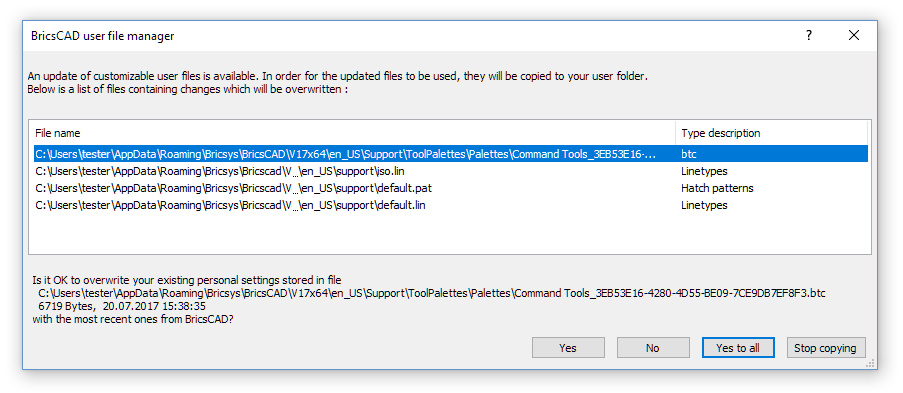
The BricsCAD user file manager
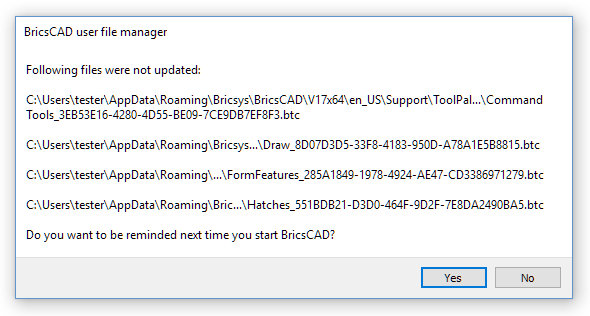
When you install an update of the software, the first time you launch BricsCAD after the update, the content of the UserDataCache folder (C:\Program Files\Bricsys\BricsCAD\UserDataCache) is compared with the content of the Local root folder and the Roamable root folder of the current user. If you have customized the files in these folders and if one or more of the corresponding files in the UserDataCache folder are more recent, the BricsCAD user file manager is launched asking you to keep your files or to overwrite them with the new version of these files.
| © Menhirs NV. All rights reserved. |