Works with BricsCAD (Windows) Classic, Pro and Platinum, BricsCAD (Linux) Classic, Pro and Platinum
Closes the current drawing.
Accessing the Command
command bar: close
shortcut: Ctrl+F4
menu bar: File | Close
: close
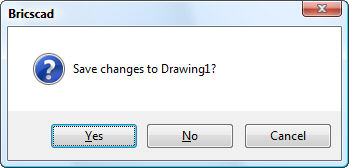
Displays a dialog box:
Click the Yes, No, or Cancel button.
Command Options
|
Option |
Description |
|
Saves the drawing before closing it. |
|
|
Does not save the drawing, and then closes it. |
|
|
Cancels the command and returns to the drawing. |
Related Commands
Open - opens drawing files.
WClose - closes the current window.
Quit - exits BricsCAD after closing open drawings.
| © Menhirs NV. All rights reserved. |